Watuba v0.1.1 Release - Enhanced Document Management & Smarter Billing
Overview
We’re excited to announce Watuba v0.1.1, a significant update focused on streamlining document management for employees and enhancing invoice billing with intelligent pricing. These changes help you stay organized, track required compliance documents, and benefit from automatic discounts on longer subscription commitments.
🎯 What’s New for Employees
My Documents - Your Personal Document Hub
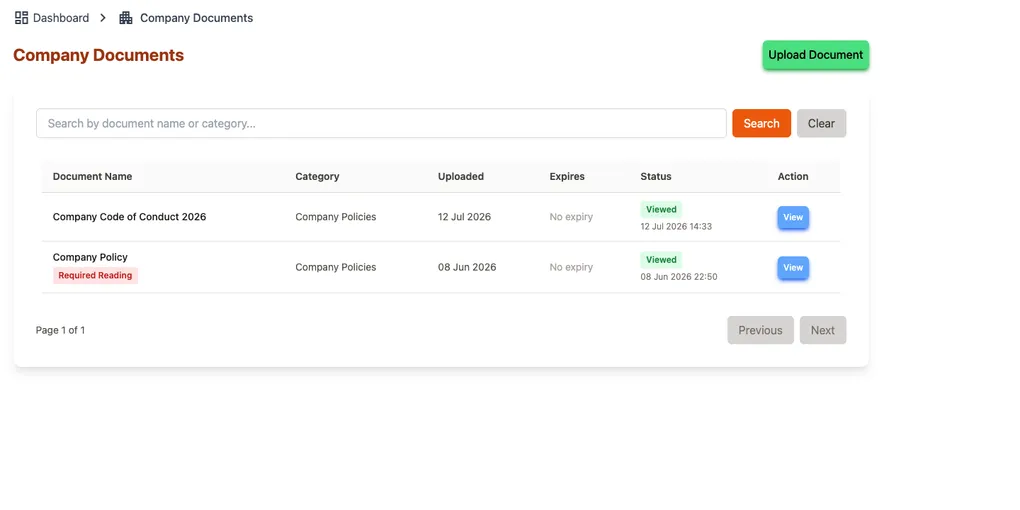
Managing your work documents just got easier! We’ve completely redesigned the employee documents interface to give you better control and visibility.
Key Features:
- 📋 Centralized Document Library: Access all your work documents in one place—payslips, contracts, training materials and more
- 🚨 Required Reading Alerts: Never miss critical compliance documents. The system now alerts you when mandatory documents require your attention, with a clear counter showing how many you still need to review
- 🔍 Smart Search & Filtering: Easily find documents by name or category, and sort by upload date or document type
- ✅ View Tracking: The system automatically tracks when you’ve reviewed each document, so you and your managers know what’s been completed
- 📄 Multiple Formats Supported: Upload and view PDFs, Word docs, Excel spreadsheets, and more
- 📱 Mobile Friendly: Access your documents from any device with our responsive design
How It Works
- Navigate to My Documents from your dashboard
- See an alert if you have unread required documents (e.g., "3 of 5 required documents need your attention")
- Search or sort documents to find what you need
- Click View to open any document—it's automatically marked as read
- See viewing history and timestamps for your records
💰 What’s New for Admins & Account Managers
Smarter Invoice Pricing with Automatic Discounts
We’ve upgraded the billing system with intelligent pricing that rewards longer commitments.
How It Works:
- Automatic Annual Discount: Subscriptions for 12+ months now receive a 10% automatic discount on your per-seat pricing
- Transparent Pricing Breakdown: Invoices clearly show the subscription period, number of seats, and applicable discounts
- Base Rate: R 29 ZAR per seat per month (South African pricing)
- Example Pricing:
- 3-month subscription: 3 months × R 29 × seats = full price
- 12-month subscription: 12 months × R 29 × seats × 0.9 = 10% discount applied automatically
Enhanced Invoice Management
Admins and account managers now have powerful new tools for invoice handling:
- Payment Confirmation Workflow: Mark invoices as paid with payment method, reference, and date tracking
- Payment Verification: Confirm amount received and generate proper audit trails
- Invoice Details Dashboard: View full invoice history with filtering and sorting by date, amount, and status
- Batch Processing: Handle multiple invoices efficiently with streamlined admin interface
Document Upload Manager
Account managers can now upload and distribute documents directly to employees:
- Employee Selection: Choose employees from a searchable, paginated dropdown
- Document Categories: Organize documents by type (Payslip, Contract, Training, etc.)
- Required Reading Flag: Mark documents as mandatory so employees receive notifications
- Bulk Upload Support: Upload multiple documents and assign them strategically
- Validation: Automatic file size (10MB max) and format validation (PDF, DOC, DOCX, XLS, XLSX)
🛠️ Technical Improvements
- Optimized Queries: Pagination and filtering optimized for faster document retrieval
- Robust Validation: Enhanced file validation and error handling
- Audit Trails: Complete tracking of document views and payment confirmations
- Improved Logging: Better diagnostic information for troubleshooting
- Database Updates: Updated schema to support new billing and document features
📊 Impact Summary
| Aspect | Before | After |
|---|---|---|
| Document Management | Basic list | Rich hub with tracking & alerts |
| Required Reading | Manual tracking | Automated with notifications |
| Annual Billing | Full price | Auto 10% discount for 12+ months |
| Invoice Admin | Manual entries | Complete workflow management |
| Document Upload | Not available | Full manager capability |
✨ User Experience Enhancements
- Modern, Responsive Design: Updated UI with Tailwind CSS for better mobile and desktop experience
- Breadcrumb Navigation: Clearer navigation paths to reduce clicks
- Visual Status Indicators: Green badges for viewed, yellow for pending, red for urgent documents
- Inline Document Viewing: Preview documents directly without downloading
- Accessible Forms: Improved form layouts with better labeling and validation messages
🚀 Getting Started
For Employees:
- Log into Watuba and visit My Documents on your dashboard
- Review any alerts about required reading
- Upload documents if permitted by your account manager
For Admin & Account Managers:
- Visit the Invoices section to manage payments and billing
- Use Document Upload Manager to distribute documents to employees
- Use Employee Lists with improved filtering to manage your team
🐛 Bug Fixes
- Fixed document pagination issues
- Improved error handling for failed file uploads
- Better validation of subscription periods for billing calculations
- Enhanced currency handling (default to ZAR)
📝 Notes
- All documents are stored securely using Cloudflare R2 storage
- Your document viewing history is private and only visible to authorized managers
- Invoices generate automatically based on your subscription configuration
- All amounts are displayed in South African Rand (ZAR)
📞 Need Help?
If you encounter any issues or have questions about the new features, please contact our support team or check the help section in your account settings.
Thank you for using Watuba!